Tingom Group Resource
HubSpot Consulting for Financial Advisors: Building an Operating System Your Team Can Trust
HubSpot RevOps for Regulated Businesses

A signed client still has work ahead
A prospect agrees to move forward. You mark the opportunity signed, but the work required to turn that prospect into a fully onboarded client is still spread across inboxes, spreadsheets, custodial systems, and individual memory.
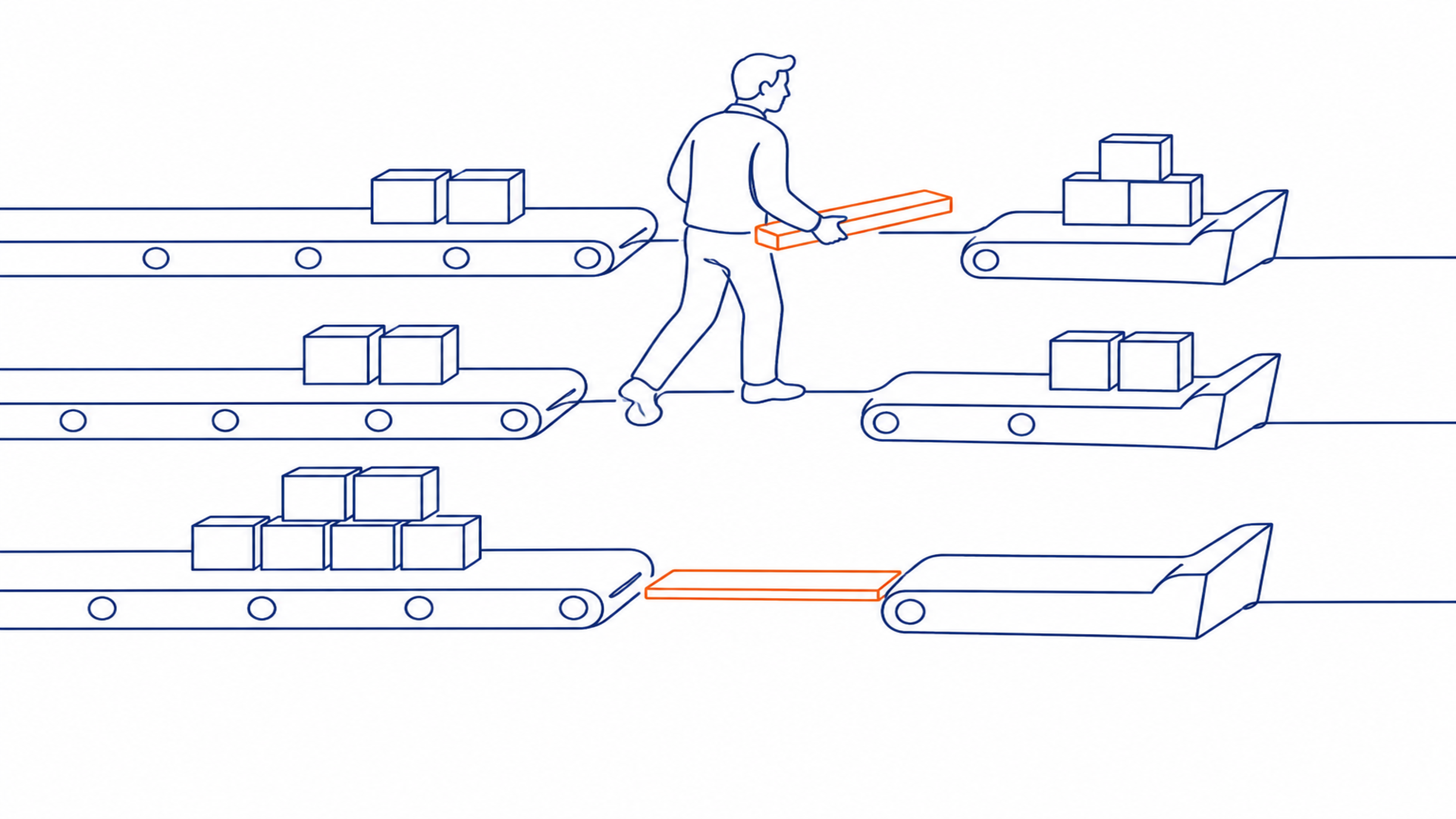
For an RIA, signing is when the operational work starts. The space between signed and funded may include custodian paperwork, ACATS tracking, funding confirmation, and compliance document collection. When ownership and status aren’t visible, you have to ask people for updates. Your client may hear different answers depending on whom they contact.
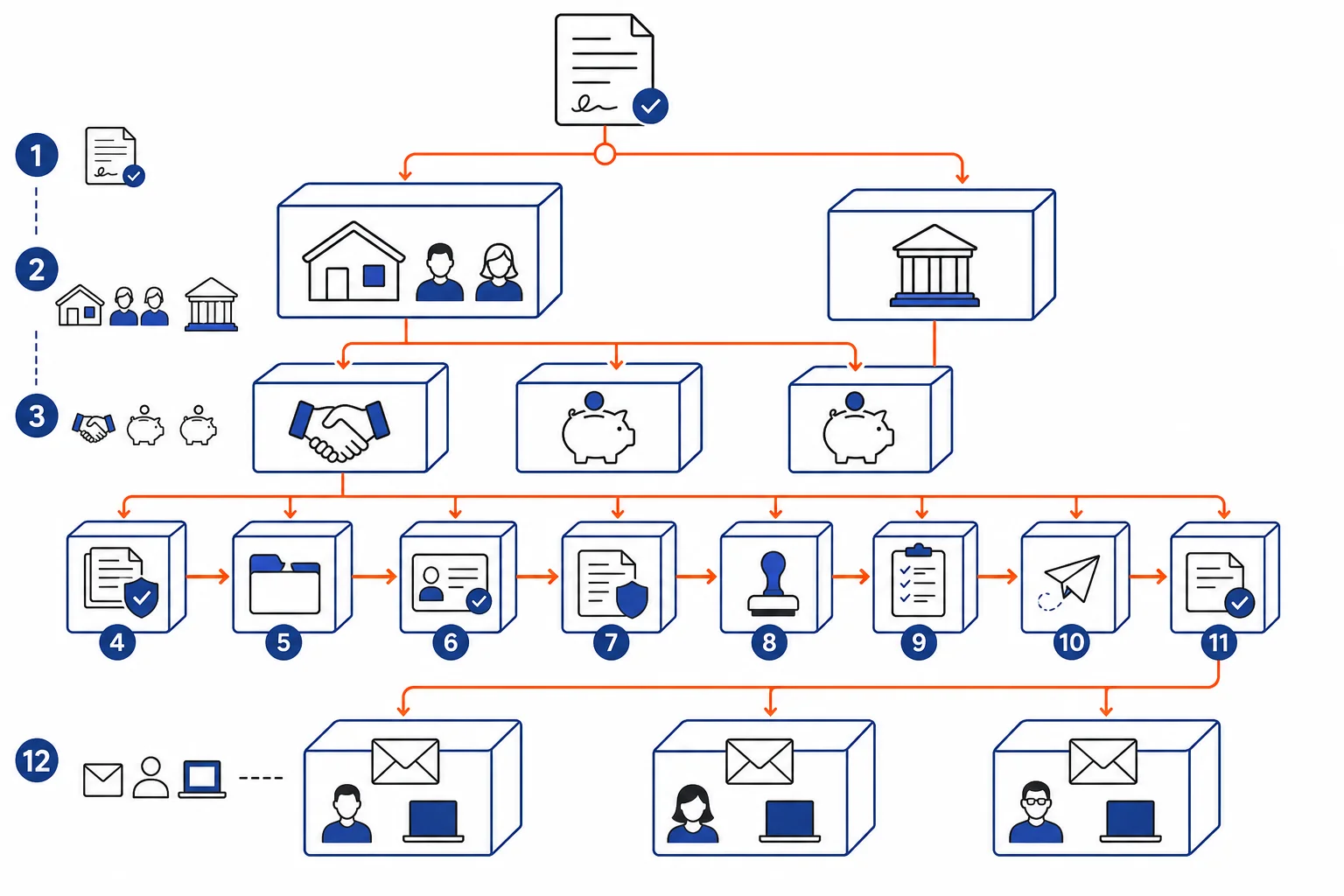
Consider a hypothetical household we’ll follow throughout this guide. Jordan and Casey Miller sign an advisory agreement. Their relationship includes joint taxable assets, two IRAs, and a family trust. The opportunity is closed, yet your team still needs to coordinate the household, entity, account, document, and transfer details before onboarding is complete.
If you run a small RIA and are evaluating HubSpot consulting, you’re deciding how this work should operate. A useful engagement defines the process, ownership, information, handoffs, and governance that HubSpot will support. The software configuration comes after those decisions.
Separate the signed stage from the onboarding runway
Your sales pipeline tracks how a prospect reaches an agreement. Typical stages may include introduction, discovery, proposal, paperwork, and signed. Each stage tells you something about progress toward a decision.
Onboarding coordinates what happens after that decision. For the Millers, your firm still needs identity and account details, the relationship between the household and family trust, required documents, internal review, custodial account-opening steps, transfer status, funding confirmation, and client communication. Their accounts may move at different speeds.
That distinction can be easy to miss when you look at the process from one role. The advisor sees a signed agreement and completed relationship conversations. The operations lead sees missing trust information and a transfer that needs follow-up. Marketing or client service may see a new client who appears ready for welcome communications. Each view can be accurate while the household remains only partly onboarded.
Can everyone see what has been completed, what is waiting, and who acts next? A controlled handoff connects the sales and onboarding workflows while giving each one its own milestones and completion criteria. “Agreement signed,” “account opened,” and “household funded” describe different operating states. A checked task or changed stage also needs enough evidence to show that the underlying work is finished.
HubSpot can support a visible signed-to-funded onboarding process through associated records, stages, tasks, workflow actions, and status reporting, depending on your firm’s subscription and configuration. The custodian remains responsible for custodial activity. Your portfolio, compliance, and other designated systems keep their defined roles. HubSpot can coordinate handoffs and shared status using information confirmed in those systems.
Build the CRM around the household journey
For the Millers, implementation begins with your firm’s process. What do you mean by prospect, signed client, onboarding, funded, and active client? What must be true, and what information must be present, before a record enters each state? Tingom Group’s CRM Foundation work starts with an audit and process strategy before system configuration.
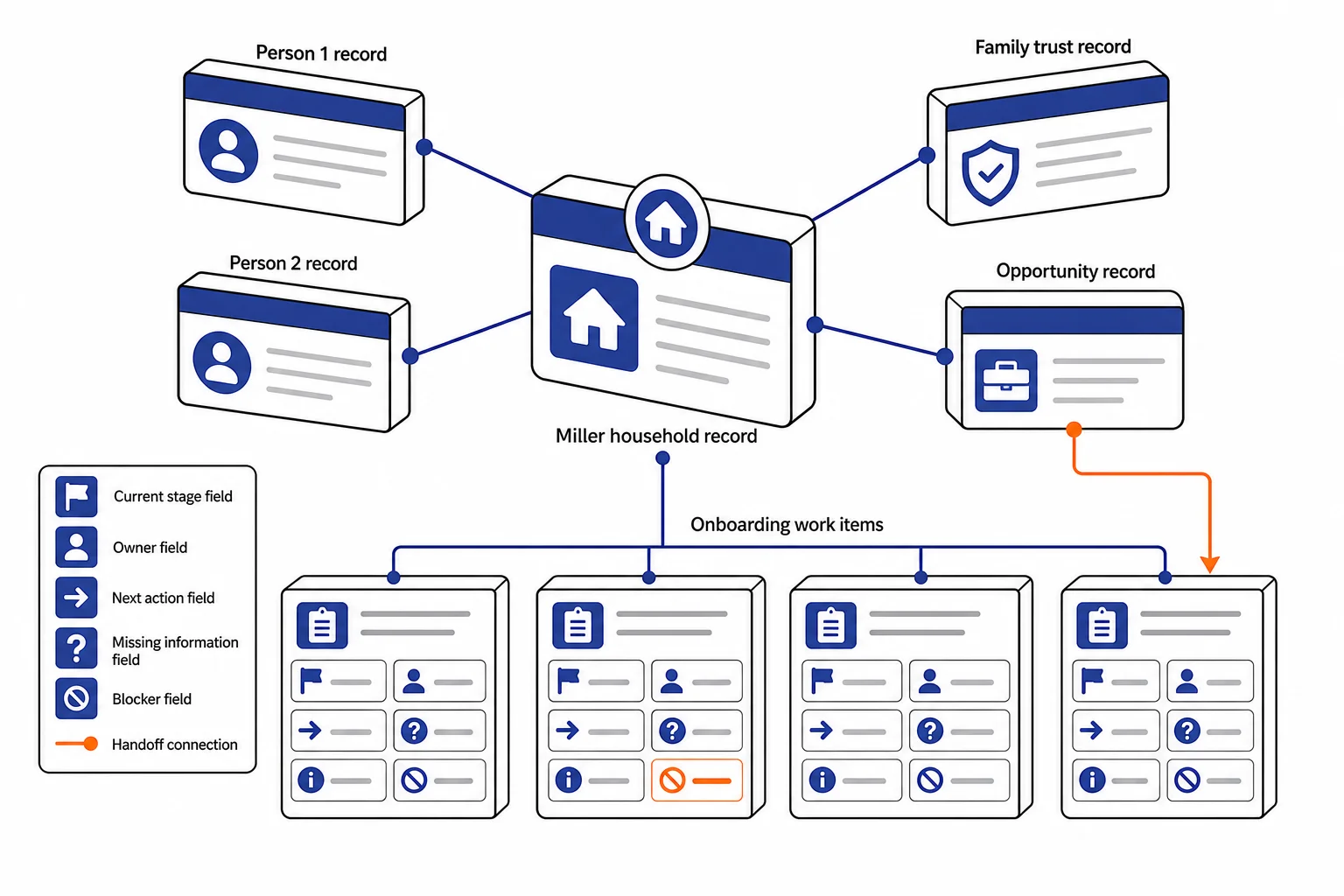
Once those definitions are clear, you can design the data structure. Your team needs a consistent way to connect each Miller, their household, the family trust, opportunities, accounts, and relevant activities. HubSpot’s objects and associations can represent connected records. Custom objects may support firm-specific entities when the standard objects aren’t enough, although availability depends on your HubSpot subscription and user permissions.
The next question is how your team will work from those records each day. Prospect and onboarding queues should show the current stage, owner, next action, missing information, and blocker. A handoff prompt might tell operations that a signed household is ready for review. Another might tell the advisor that the team is waiting for client input.
Automation is useful when the rule is clear and the work repeats. It becomes less useful when the situation calls for judgment. An entity issue, an unusual ownership arrangement, or conflicting information should stay visible for staff review rather than being pushed through a standard sequence.
A complete implementation also covers integrations, permissions, reports, training, and administration. Each integration needs matching rules, a defined data direction, error handling, and limits on what enters HubSpot. Reports should follow household progress and show stalled or incomplete work. Training should be role-specific so advisors, operations staff, and marketing or client-service users can see how their daily work fits the process.
After launch, an internal CRM owner or consulting partner should review fields, duplicate records, associations, workflows, permissions, dashboards, and integrations on a recurring schedule. When your process changes, the configuration should change in a controlled way instead of accumulating one-off workarounds.
HubSpot won’t be the right answer for every firm or every workflow. If your existing systems already provide dependable ownership, status, and reporting, adding another platform may create more work. The decision should follow the operating need. These recommendations are technical and operational; your legal and compliance professionals must determine regulatory obligations, required supervision, approved communications, and records-retention rules before translating those requirements into CRM configuration.
Decide which system owns each type of data
Before you create fields or reports, decide which system is authoritative for each data domain. Otherwise, the Miller household’s account status may differ across HubSpot, the custodian, and an operations spreadsheet. Which value should your team trust?
A practical boundary map might look like this:
|
Miller household data |
Likely authoritative system |
HubSpot’s role |
|---|---|---|
|
People, household, entities, relationship history |
CRM, based on firm policy |
Maintain context and associations |
|
Custodial accounts and funding status |
Custodial or onboarding platform |
Show selected status for coordination |
|
Holdings, balances, performance, and billing |
Portfolio, performance, or billing system |
Link to the source or display limited workflow data |
|
Required records, preserved communications, and supervisory evidence |
Approved compliance archive or designated recordkeeping system |
Support approved communications and related activity context |
|
Client-service work |
Firm-designated service or work-management system |
Coordinate requests, tasks, and handoffs where appropriate |
HubSpot can coordinate prospecting, relationship context, communications, tasks, and selected operational reporting. Its one-way and two-way data sync options can move approved fields between connected applications. For every synchronized field, document the source, direction, matching key, owner, refresh expectation, and conflict rule. If two systems disagree, your team should already know which one governs and who resolves the difference.
Your firm should review this design against its compliance, privacy, retention, and supervisory requirements. Electronic records need controls that protect them from loss, alteration, destruction, or unauthorized access while preserving complete, legible, retrievable records. State requirements may also apply.
A CRM configuration doesn’t provide compliance approval, an audit deliverable, or legal advice. Tingom Group’s HubSpot implementation work connects CRM infrastructure to the firm’s operating process, while specialized advisory systems retain their defined authority.
Define ownership, actions, and escalation paths
Once the system boundaries are clear, decide who moves the Miller household through each step. A workable role map might assign the advisor to relationship and recommendation conversations, operations to defined onboarding steps and exceptions, and marketing to approved prospect and client communications. Your firm should validate that model against its own supervisory structure and policies.
For every handoff, document:
- the named owner
- the event that triggers the handoff
- the information required before work begins
- the next action
- the condition that confirms completion
- the path for exceptions or missing information
For example, moving the Miller household to “signed” could assign operations an onboarding task once the required relationship details are present. Operations would manage the defined paperwork and transfer steps. An exception involving the trust, an authorized party, or a missing document would go to the firm-designated reviewer. Completion conditions should distinguish among account opened, funded, and welcome complete.
HubSpot can assign record owners and rotate assignments through workflows, subject to subscription, seat, object, and permission requirements. Workflows can also create tasks and send internal notifications. Access to records, activities, and workflows still requires separate permission decisions.
A consultant should help your team make the role and escalation decisions, test what your HubSpot account can support, configure the approved design consistently, and train people to work from assigned records and next actions. You should be able to see who owns the work without searching an inbox or asking around.
Build reports around operating exceptions
A useful dashboard shows where signed-to-funded work needs attention. HubSpot can report across record properties, activities, and associated objects, depending on your firm’s subscription and data model.
Start with a small set of diagnostic measures:
- signed opportunities that have not entered onboarding
- time spent in each defined onboarding step
- records missing required household, entity, or account information
- work without an owner or documented next action
- exceptions awaiting review or resolution
- repeated work caused by incomplete or incorrect information
These measures don’t need universal benchmarks. Your firm should define acceptable timing and escalation thresholds based on its process, staffing, custodial relationships, and supervisory requirements. A polished dashboard won’t fix inconsistent definitions or incomplete records. The report becomes dependable when the work underneath it is dependable.
Review exceptions and data quality on a recurring operational cadence. The people responsible should confirm ownership, resolve stale actions, correct incomplete records, and assign follow-up. Periodically, step back and review lifecycle and stage definitions, permissions, workflows, integrations, reports, user adoption, and maintenance priorities. Field-level permissions can limit who may edit critical properties.
Clean, governed data also limits responsible AI use. AI-generated summaries or suggestions may help with review, but incomplete, inconsistent, or outdated CRM records can produce inaccurate or generic output. Your firm should control access to AI features, monitor their use, and require human review before generated content or recommendations inform client or operational decisions.
Use a buyer checklist to compare consultants
When you speak with a consultant, listen for how they think about your operating process before they discuss configuration. Ask each candidate to explain how they would:
- learn your current prospect, household, entity, review, onboarding, and funding workflows before configuring HubSpot
- define which data belongs in HubSpot and which systems remain authoritative for custody, portfolios, compliance records, and other specialized functions
- handle implementation, integrations, customization, automation, reporting, permissions, testing, and ongoing maintenance
- train advisors, operations staff, and marketing or client-service users, then coach the team through adoption
- govern changes after launch, including who approves new fields, workflows, reports, permissions, and integrations
Pay attention to the questions they ask. Do they want to understand how a signed household moves through your firm? Do they ask where account status comes from, how exceptions are handled, and what evidence confirms completion? A candidate who moves directly to workflows and dashboards may be skipping the decisions that make those features useful.
Request relevant references or work examples you can validate. Ask who will perform discovery, architecture, configuration, training, and support. Credentials can help with initial screening. The HubSpot Solutions Directory supports filtering by services, industries, regions, and credentials, but credentials alone don’t establish RIA workflow fluency.
Compare proposals with equivalent scope. Each should state responsibilities, assumptions, exclusions, documentation, training, launch criteria, and post-launch support. Discuss price and engagement structure based on your data's condition, migration needs, integrations, customization, and ongoing governance. A low generic estimate may leave out cleanup, testing, documentation, or training. Published pricing benchmarks combine very different projects, so they’re a poor substitute for a scope tied to your firm’s operating requirements.
You may also decide that HubSpot isn’t the best fit. A good consultant should be willing to say so when the platform would duplicate a system you already trust, require more administration than your team can support, or fail to match the workflow you need.
Trace one client before choosing the work
Choose one recent client and follow the record from signed agreement through funded or fully onboarded status. Compare the system record with what actually happened. Where did someone re-enter information, wait for an unassigned decision, rely on memory, or stop trusting the report? Where did the client have to repeat something your firm already knew?
You don’t need to redesign the entire client journey to learn from it. One household can show whether the gap comes from an unclear definition, missing information, weak ownership, a system limitation, or some combination of those conditions. That gives you a more useful basis for deciding whether you need a process change, a HubSpot configuration change, or a different tool.
If you need help validating the gap, start with Tingom Group's GTM Gap Finder. If the gap is already clear, book a discovery call to discuss the appropriate implementation, advisory, or fractional-support path.
Sources
- Streamline Client Onboarding | RIA Client Engine | Tingom Group — Tingom Group
- Streamline Onboarding and Supervision | Enhance Your HubSpot Portal | Advisor Client Engine — Tingom Group
- Clean CRM Implementation | Enhance Compliance and Trust — Tingom Group
- Manage your data model — HubSpot Knowledge Base
- Sync custom objects between HubSpot and data sync apps — HubSpot
- NASAA Recordkeeping Requirements For Investment Advisers Model Rule 203(a)-2 — North American Securities Administrators Association
- HubSpot Implementation | Align Your Business Operations | Tingom Group — Tingom Group
- Assign and rotate record owners using workflows — HubSpot
- Create Reports with the Custom Report Builder | HubSpot Knowledge Base — HubSpot
- Maintain a trusted source of customer data — HubSpot
- Use the HubSpot Solutions Directory — HubSpot Knowledge Base
- GTM Gap Finder — Tingom Group
- GTM Gap Finder | Discovery Call for HubSpot Support | Tingom Group — Tingom Group